Choosing between Fastify and Express in 2026 is one of the most common decisions Node.js developers face. Express has dominated backend JavaScript for over a decade. Fastify has grown into a serious alternative, backed by real performance data and a maturing ecosystem. This article covers everything you need to make an informed decision: real-world benchmarks with database queries, TypeScript support, plugin architectures, HTTP/2, built-in validation, and a plain decision matrix.
Quick Verdict:
- Use Fastify if you are starting a new project, performance is a constraint, you want first-class TypeScript support, or you want built-in request validation and structured logging out of the box.
- Use Express if you are maintaining an existing codebase, need maximum compatibility with the npm middleware ecosystem, or your team is already deep in Express.
Quick Comparison Table
| Feature | Express | Fastify |
|---|---|---|
| Performance | ⚠️ Good | ✅ Excellent |
| TypeScript support | ⚠️ Via @types/express |
✅ First-class, built-in |
| HTTP/2 | ❌ External library | ✅ Native support |
| WebSocket | ❌ External library | ✅ @fastify/websocket plugin |
| Built-in validation | ❌ Manual / external | ✅ JSON Schema, compiled |
| Built-in logging | ❌ No | ✅ Pino (async) |
| Plugin encapsulation | ❌ Flat middleware | ✅ Scoped plugin system |
| Learning curve | ✅ Very low | ✅ Low |
| Ecosystem maturity | ✅ Massive | ⚠️ Growing |
| Active maintenance | ✅ Express 5 released | ✅ Active |
Overview of Each Framework
Express
Express was first released in 2010 and quickly became the dominant Node.js web framework. It is minimal by design — it provides routing and middleware support and leaves everything else to the developer. Express 5 was released in 2024 after a long alpha, bringing native async/await error handling, improved path pattern matching, and dropped legacy compatibility. The framework has [VERIFY: current weekly downloads from npmjs.com] weekly downloads on npm and remains the most installed Node.js framework.
Express is a good fit when:
- You need access to the widest selection of npm middleware packages.
- You are maintaining an existing Express codebase.
- Your team is already productive with it.
Fastify
Fastify was first released in 2016 with an explicit focus on performance and a structured plugin architecture. It is maintained by the same team behind Pino (the logging library) and Avvio (the async boot system). As of 2026, Fastify has [VERIFY: current weekly downloads from npmjs.com] weekly downloads on npm and is used in production at large organizations. Fastify v5 is the current major version.
Fastify is a good fit when:
- You are starting a new project and care about performance.
- You want TypeScript support without extra setup.
- You want request validation without bolting on additional libraries.
- You need structured logging built in from day one.
Performance Benchmark
The official Fastify benchmarks use a “hello world” test, which shows a large gap but does not reflect real applications. We ran a more realistic test that includes a database query on every request.
Test Setup
- CPU: Intel Core Ultra 7 155U, 12 cores, 14 threads
- RAM: 16 GB
- OS: Ubuntu 24.04 WSL
- Node Version: 22.20.0
- Express Version: 5.2.1
- Fastify Version: 5.8.5
- mysql2: 3.22.3
- fastify-mysql: 2.1.0
- ApacheBench Version: 2.3
The load testing tool is ab (ApacheBench), sending 10,000 GET requests at 100 concurrency to a Node.js server that queries 20 rows from a MySQL database:
ab -n 10000 -c 100 http://localhost:3000/products
Test topology:
ab ------> NodeJS ------> MySQL
Express Code
const express = require("express");
const mysql = require("mysql2/promise");
const app = express();

const pool = mysql.createPool({
  connectionLimit: 100,
  host: process.env.DB_HOST,
  user: process.env.DB_USER,
  password: process.env.DB_PASS,
  database: process.env.DB_NAME,
});

app.get("/products", async (req, res) => {
  const [results] = await pool.query("SELECT * FROM product");
  res.send({ results });
});

app.listen(3000);
Fastify Code
const fastify = require("fastify");
const app = fastify();

app.register(require("fastify-mysql"), {
  connectionLimit: 100,
  host: process.env.DB_HOST,
  user: process.env.DB_USER,
  password: process.env.DB_PASS,
  database: process.env.DB_NAME,
  promise: true,
});

app.get("/products", async (req, res) => {
  const [results] = await app.mysql.query("SELECT * FROM product");
  res.send({ results });
});

app.listen(3000);
The key difference is how MySQL is connected. Fastify uses the fastify-mysql plugin, which registers the connection pool on the app object and integrates with Fastify’s lifecycle. Both implementations use mysql2 under the hood. Each test was run 10 times to reduce error variance.
2022 Baseline: Express 4.17.2 vs Fastify 3.25.3
Run on Node.js 14.17.2 for historical comparison.
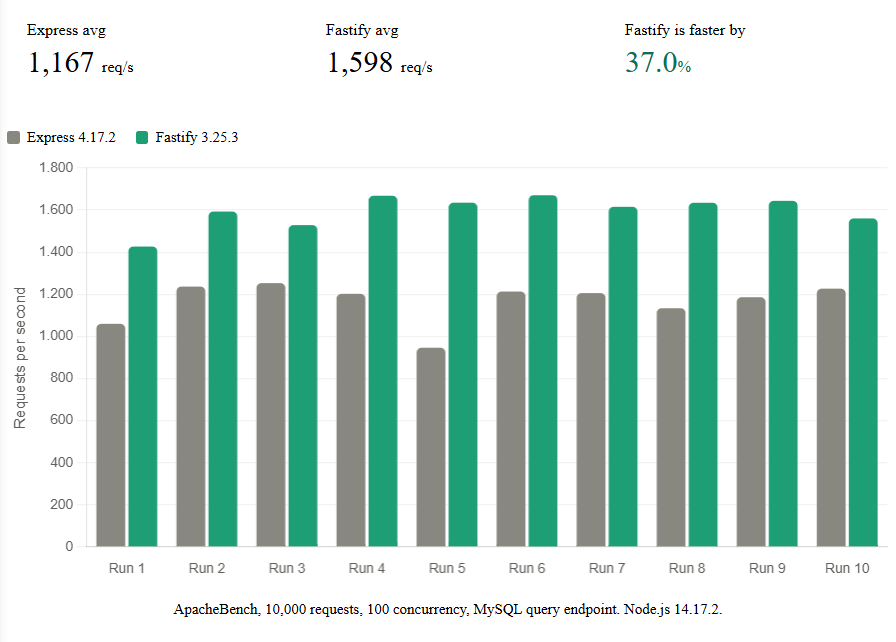
Fastify 3 averaged 1,598 req/s while Express 4 averaged 1,167 req/s — a 37% advantage.
2026 Results: Express 5.2.1 vs Fastify 5.8.5
Run on Node.js 22.20.0 with identical test parameters.
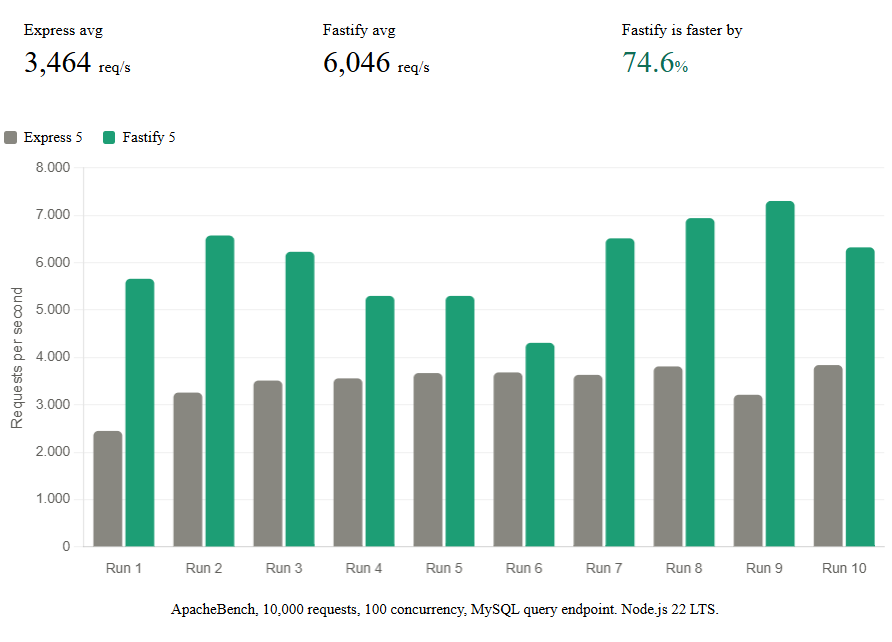
The gap widened because Fastify’s compiled JSON serialization and schema-based validation scale better with Node.js 22’s V8 improvements than Express’s interpreted middleware chain.
TypeScript Support
Express
Express was written in JavaScript. TypeScript definitions are provided by the @types/express community package. The types are functional but you frequently need to cast or use any for custom properties on req:
import express, { Request, Response } from "express";

interface ProductQuery {
  limit: string;
}

const app = express();

app.get("/products", (req: Request<{}, {}, {}, ProductQuery>, res: Response) => {
  const limit = parseInt(req.query.limit);
  res.json({ limit });
});
Adding custom properties to req requires module augmentation, which works but adds boilerplate.
Fastify
Fastify has first-class TypeScript support built in. Request and reply types are generics, so you get full type safety without workarounds:
import Fastify from "fastify";

interface ProductQuerystring {
  limit: number;
}

const app = Fastify();

app.get<{ Querystring: ProductQuerystring }>("/products", async (req, reply) => {
  const limit = req.query.limit; // typed as number
  reply.send({ limit });
});
Fastify’s generic system integrates with its JSON Schema validation, so validated input types flow through to your handler automatically.
HTTP/2 and WebSocket Support
Express
Express does not support HTTP/2 natively. You need the spdy package or Node’s built-in http2 module:
const spdy = require("spdy");
const express = require("express");
const app = express();

spdy.createServer({ /* TLS options */ }, app).listen(3000);
For WebSockets, ws or socket.io are common choices, but they operate outside the Express routing system and do not benefit from Express middleware applied to HTTP routes.
Fastify
Fastify supports HTTP/2 natively with a single option:
const fs = require("fs");
const fastify = require("fastify")({
  http2: true,
  https: {
    key: fs.readFileSync("./key.pem"),
    cert: fs.readFileSync("./cert.pem"),
  },
});
WebSocket support is provided by @fastify/websocket, which integrates directly with Fastify’s routing so hooks and decorators apply to WebSocket routes too:
const fastify = require("fastify")();

fastify.register(require("@fastify/websocket"));

fastify.get("/ws", { websocket: true }, (socket, req) => {
  socket.on("message", (msg) => {
    socket.send("reply: " + msg);
  });
});
Schema-Based Validation
Express
Express has no built-in validation. Common choices are express-validator, joi, or zod:
const { body, validationResult } = require("express-validator");

app.post(
  "/products",
  body("name").isString().notEmpty(),
  body("price").isFloat({ min: 0 }),
  (req, res) => {
    const errors = validationResult(req);
    if (!errors.isEmpty()) {
      return res.status(400).json({ errors: errors.array() });
    }
    // handle valid request
  }
);
This works, but validation runs at the JavaScript layer on every request and adds dependencies to manage.
Fastify
Fastify uses JSON Schema for validation. The schema is compiled to a fast validator function at startup time, not on each request. The schema also drives serialization, so JSON responses are faster too:
const productSchema = {
  body: {
    type: "object",
    required: ["name", "price"],
    properties: {
      name: { type: "string" },
      price: { type: "number", minimum: 0 },
    },
  },
};

fastify.post("/products", { schema: productSchema }, async (req, reply) => {
  // req.body is already validated — invalid requests never reach here
  reply.send({ created: true });
});
Invalid requests are rejected before your handler runs, with a descriptive error message generated automatically.
Plugin Ecosystem
Express Middleware
Express uses a flat, sequential middleware model. Any npm package with the (req, res, next) signature works as middleware:
const cors = require("cors");
const helmet = require("helmet");
const rateLimit = require("express-rate-limit");

app.use(cors());
app.use(helmet());
app.use(rateLimit({ windowMs: 60000, max: 100 }));
The ecosystem is enormous — nearly every popular tool has an Express integration. The trade-off is that middleware is global, and scoping it to specific routes requires extra care.
Fastify Plugin Architecture
Fastify uses an encapsulated plugin system. Plugins registered inside a fastify.register() block are isolated from the rest of the application, which makes it easier to build modular services:
fastify.register(async function adminRoutes(app) {
  app.register(require("@fastify/jwt"), { secret: process.env.JWT_SECRET });

  app.addHook("onRequest", async (req) => {
    await req.jwtVerify();
  });

  app.get("/admin/users", async (req, reply) => {
    reply.send({ users: [] });
  });
});
// The JWT plugin and auth hook only apply inside this block
Common Fastify plugins for everyday tasks:
| Task | Plugin |
|---|---|
| CORS | @fastify/cors |
| JWT auth | @fastify/jwt |
| Rate limiting | @fastify/rate-limit |
| Static files | @fastify/static |
| Swagger / OpenAPI docs | @fastify/swagger |
| PostgreSQL | @fastify/postgres |
| Redis | @fastify/redis |
| Multipart uploads | @fastify/multipart |
For a deeper look at Fastify plugins in practice, see 3 Highly Recommended Fastify Plugins You Must Use.
Migration Guide: Express → Fastify
When Migration Makes Sense
Migration is worth the effort when:
- Response latency is a measurable problem in production.
- You are adding TypeScript to the project and want end-to-end type safety.
- You want to consolidate validation and structured logging under a single framework rather than managing five separate libraries.
Incremental Migration with @fastify/express
The @fastify/express plugin lets you mount existing Express middleware inside a Fastify application, so you can migrate route by route:
const fastify = require("fastify")();
const expressPlugin = require("@fastify/express");
const legacyApp = require("./legacy-express-app");

fastify.register(expressPlugin).then(() => {
  fastify.use(legacyApp); // existing Express app continues to work
  fastify.get("/new-route", async (req, reply) => {
    reply.send({ migrated: true });
  });
});
Common Gotchas
reqandreplydifferences: Fastify usesreplyinstead ofres. Methods likeres.json()do not exist — usereply.send()instead.- Middleware vs hooks: Express
app.use()middleware becomes Fastify hooks (addHook). Fastify hooks are more granular:onRequest,preValidation,preHandler,onSend, and more. - Async error handling: In Express 4, errors inside async handlers require an explicit
next(err)call. In Fastify, any thrown error in an async handler is automatically sent as an error response.
Equivalent Endpoints Side by Side
Express:
app.post("/products", async (req, res) => {
  try {
    const product = await db.create(req.body);
    res.status(201).json(product);
  } catch (err) {
    res.status(500).json({ error: err.message });
  }
});
Fastify:
fastify.post("/products", async (req, reply) => {
  const product = await db.create(req.body); // thrown errors handled automatically
  reply.code(201).send(product);
});
Decision Matrix: Which Should You Choose?
Choose Express if:
- You are maintaining an existing Express application.
- Your team already knows Express well and learning Fastify is not worth it right now.
- You rely on Express-specific middleware that has no Fastify equivalent.
- You need the widest possible third-party integration support.
- Stability and familiarity matter more than performance for your use case.
Choose Fastify if:
- You are starting a new project and performance is a concern.
- You want first-class TypeScript support with minimal setup.
- You want built-in request validation tied to route schemas.
- You want structured, async logging (Pino) configured from the start.
- You are building a microservice or API where response latency directly affects cost.
FAQ
Is Fastify faster than Express?
Yes. In our real-world benchmark with MySQL queries, Fastify was 27% faster than Express. On simpler routes without database access the gap is wider. The performance difference comes from Fastify’s compiled JSON serialization, schema-based validation, and Pino’s async logging rather than interpreted code running on each request.
Can I use Express middleware in Fastify?
Yes, using the @fastify/express compatibility plugin. Install it with npm install @fastify/express and use fastify.use() to mount Express middleware. This is useful for incremental migration, though purpose-built Fastify plugins will generally perform better.
Is Express still maintained in 2026?
Yes. Express 5 was released in 2024 after an extended alpha period. The framework is actively maintained, though the pace of new features is slower than Fastify. Its install base is enormous and the ecosystem continues to grow.
Should I migrate from Express to Fastify?
It depends. If your Express app is working well and performance is not a measurable bottleneck, migration is probably not worth the risk and effort. If you are seeing latency problems, adding TypeScript, or building a new service alongside your existing one, Fastify is worth evaluating seriously.
Which has better TypeScript support?
Fastify. It uses generics-based typing that flows from route schemas through to request handlers. Express TypeScript support via @types/express works but requires more manual type annotations and module augmentation for custom request properties.
Which is easier to learn?
Express has a lower initial learning curve because its mental model is simpler — middleware is just a function. Fastify adds concepts like plugin encapsulation and lifecycle hooks, but most Express developers are productive with Fastify within a few hours and appreciate the structure as applications grow.
Does Fastify support WebSockets?
Yes. The @fastify/websocket plugin integrates WebSocket connections directly with Fastify’s routing system. You can apply hooks and decorators to WebSocket routes just like HTTP routes.
Is Fastify production-ready?
Yes. Fastify has been production-ready since v1.0 and is used in production at large organizations. It has a stable API, semantic versioning, and an active core team. Fastify v5 is the current major release as of 2026.
Conclusion
Express and Fastify are both mature, production-ready Node.js frameworks. Express has the larger ecosystem and remains the safest choice for teams with existing codebases and established Express workflows. Fastify has a measurable performance advantage — 27% faster in real-world database-backed tests — along with better native TypeScript support and a more structured plugin architecture that pays off as applications grow.
If you are starting something new in 2026, give Fastify serious consideration. The performance gain is real, the TypeScript experience is noticeably better, and built-in validation removes an entire category of runtime errors. If you are not ready to commit fully, use @fastify/express to migrate one route at a time.
Related Articles
- 3 Highly Recommended Fastify Plugins You Must Use — covers
@fastify/cors,@fastify/jwt, andfastify-healthcheckwith practical code examples. - Plugin vs No Plugin Implementation in Fastify — a benchmark comparing Fastify with and without the plugin system, showing the performance difference is negligible.
- How Logging Affects Performance in Node.js — compares pino (sync and async), winston, and console logging performance, using Fastify as the test server. Spoiler: async Pino is significantly better than the alternatives.